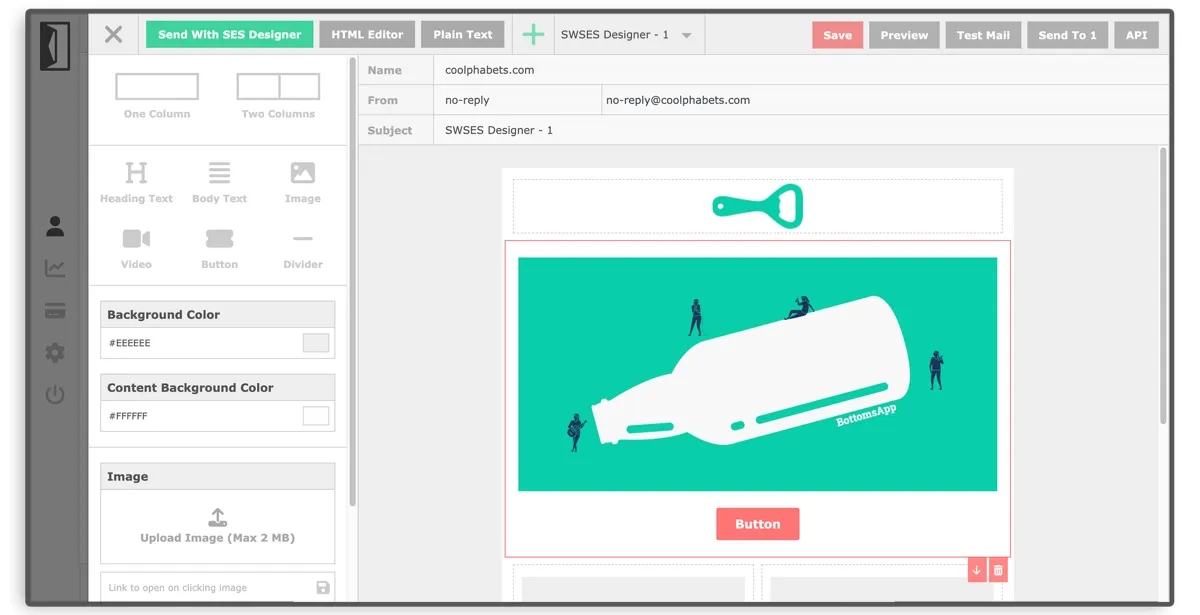
Drag & Drop Editor to create HTML Email Templates that are 100% compatible with AWS SES and work in every email client including outlook.
The core of SENDUNE is the HTML email template designer. It lets you create and save AWS SES compatible templates that you can use to send emails manually or via the API.
The source code is available on Github under the MIT license.
A demo is available here: https://designer.sendune.com/
HTML for email is probably the hardest code to write. Even a teeny-tiny deviation from the rules will break the email in untold combination of os/desktop/mobile clients.
The SENDUNE email designer focuses on simplicity and ease of use. It is light-weight. It does pure HTML - no intermediate code wranglers like mjml. There is no lock-in of any kind. Save HTML output as a SES compatible template that works in any email client, desktop and mobile.
Three Ways To Create Templates
The AWS SES Email Template Editor comes with three template types that let you design any kind of transactional or marketing emails. Altogether, you can create and save unlimited templates.
Drag and Drop Designer
- Start designing beautiful emails immediately.
HTML Editor
- Edit HTML templates you already have or code them from scratch.
Plain Text Emails
- 'Minimalists'. This is for you.
Built On Solid Fundamentals.
Follows a few fundamental rules to design emails that work in nearly all email clients (web and mobile)
Live Demo.
Play around with the live demo at https://designer.sendune.com. You can design a template and send yourself a test email.
Installation
Install via NPM:
npm install @send-with-ses/ng-email-designerOr via YARN:
yarn add @send-with-ses/ng-email-designerImage Handling
You can use a cloud storage of your choice (ex: AWS S3, Cloudflare R2, GCP Cloud Storage etc) for storing your images. Please implement your image upload functionality and provide it to the library as below (imageUploadTriggered/imageSelectionTriggered).
<lib-email-designer #emailEditor class="px-0"
[type]="selectedTemplateType" [template]="selectedTemplate"
(imageSelectionTriggered)="onImageSelectionTrigger($event)"
(imageUploadTriggered)="onImageUploadTrigger($event)"
(emailContentChanged)="onEmailContentChange($event)"
>
</lib-email-designer>
More documentation: the designer on npm
UI Theming and Styles
You can make a few changes to make the AWS SES Email Template Designer match your website colors.
Import the following styles into your global styles file (e.g., styles.scss):
@import '../node_modules/@send-with-ses/ng-email-designer/src/lib/theme.scss';
@import '../node_modules/@send-with-ses/ng-email-designer/src/lib/email-editor.css';
To make the Email Designer match your website's UI, include the following in your main.scss or styles.scss file and change the colors as you like.
:root {
--sws-icon-color: #ccc;
--sws-icon-hover-color: #555;
--sws-header-background: #eee;
--sws-header-text-color: #555;
--sws-border-color: #ccc;
}
Contribute.
Feel free to fork the repository, make improvements, and submit pull requests.
Issues or Ideas.
Spotted a bug or got an idea? Just open an issue or write to designer at sendwithses dot org.
SENDUNE AWS SES Template Editor.
Available on Github. MIT license.
https://github.com/SendWithSES